Tech-notesPreferred BrowserWe recommend using Firefox. Note that whatever browser you are going to use, you MUST enable pop-up for Fablusi to work properly. Working with Internet Explorer 6.0+IE6 works with Fablusi client to play our role play simulation. However, you must enable pop-up in order to work. At the borwser Menu goto Tools/Internet Options/Privacy, at the bottom is the pop-blocker. Make sure you either have that un-ticked or click Settings next to it and in "Address of Web site to allow" type in www.fablusi.com and click ADD finally click OK. Many people install other tools bars as well, such as Google tool bar or MSN tool bar. These tool bars also block pop-up and you need to enable our sites' pop-up individually. Note: the authoring and the administration environment of Fablusi is NOT compatible with IE 6. You need to use Firefox to author or administer any simulation. Working with Netscape 8.0.1At this point, we do not recommend using Netscape 8. Although Fablusi will continue to work after your installation of Netscape 8 in both Netscape and Firefox, your Internet Explorer will not be able to render some other xml based pages. See Albert's blog for further details. The authoring and adminstration of simulations is compatible with Netscape 8.0.1. However, due to Netscape 8's default behaviour, you need to do two things. 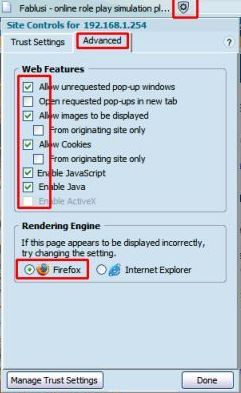 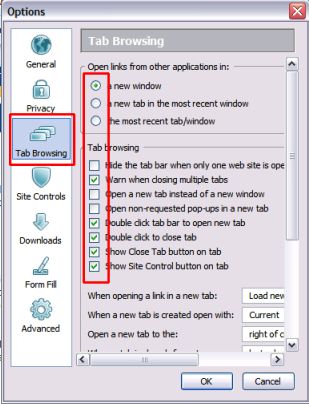
Tech-notes: Created 24th May, 2005; last Update: 10th, August 2005 |
